
It is the last week of the month in Dar es Salaam. Your QS opens the Excel file for the block of flats in Mbezi and the numbers do not look right. Concrete is well past what the BOQ allowed. Some of the cement bought for that site was sent to the Kigamboni job "just for a few days" and never booked back. The steel fixer's subcontractor has sent a bill, and nobody is sure if the work was checked. The IPC for the client is still being typed by hand, and someone has to find out how much retention the client is holding on the job you finished last year.
None of this is because your team is careless. It happens because the estimate lives in one spreadsheet, the budget in another, purchases in a WhatsApp group, site progress in a notebook and invoices in the accounting system. By the time the numbers meet, the money has already been spent.
We built Chesify Construction, a construction management module for Odoo 20, so that the estimate, the budget, the site, the stores, the subcontractors and the client's payments all sit in one system. Here is how a project runs through it, from the first rate to the final retention release.
1. Estimate: rate analysis and a BOQ you can trust
Every project starts with a site, for example "Opera Heights", and one or more sub-projects such as "Tower A". Stakeholders, permits, documents and insurance are kept on the project. Each sub-project gets its own site store (warehouse) automatically, so the materials for Tower A are never mixed up with anyone else's.
Your estimators price each item with a rate analysis: material, equipment, labour and overhead. Save a rate analysis as a template and use it again on the next project instead of rebuilding it from scratch.
The Bill of Quantities sits on the sub-project. If your QS already has the BOQ in Excel, import the xlsx file instead of retyping it. Each BOQ line carries both your cost and the contract value, so you can see your margin per line before you sign.
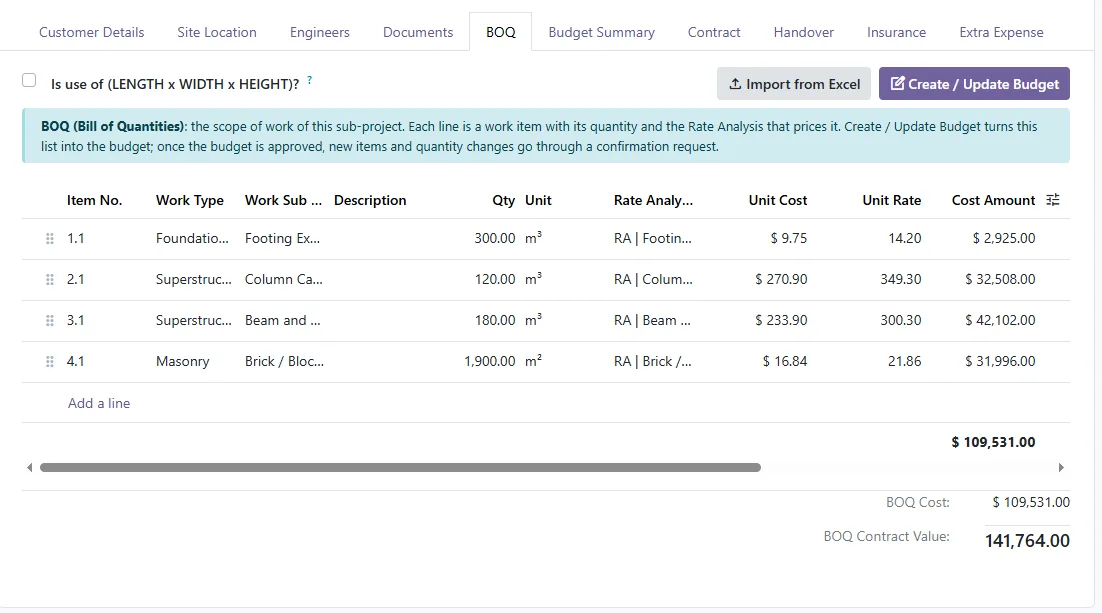
In our demo, Tower A has two BOQ lines: footing excavation of 420 m3 and column casting of 180 m3. That BOQ gives a budget of TZS 132,142,500 against a contract value of TZS 172,095,000 (illustrative figures).
2. Budget: one click, then approval
Click once and the BOQ becomes the project budget. Nobody copies cells from one sheet to another.
The budget then goes through approval. The QS submits it, the project manager approves it, and only then can the project be started. Everyone knows which version is the real budget.
Projects change, though. Say the architect adds 12 m3 of columns. In Chesify Construction, any change to a budget line goes through a change request. The approval card shows the impact on the budget and the reason for the change. The request is logged even if it is rejected, so six months later you can still see who asked for what and why.
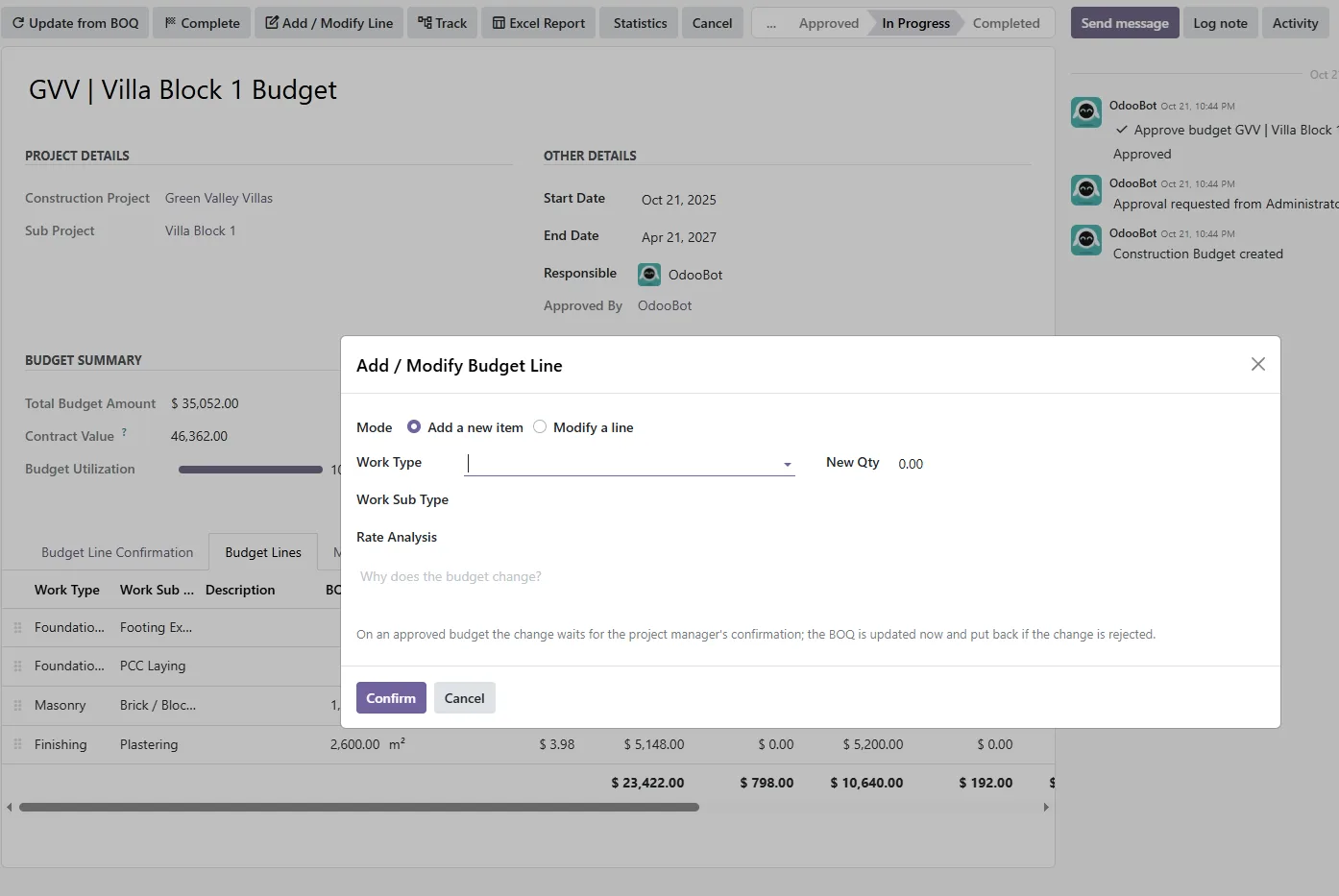
From then on, every budget line shows three numbers: budget, committed (what you have already ordered or subcontracted) and actual (what has been spent). You no longer find out at month-end. You find out when the purchase order is raised.
3. Work: phases, work orders and timesheets
BOQ lines become phases, giving you a work breakdown structure that matches what you priced. Under each phase, site engineers create work orders with quantities and checklists.
Labour is booked through timesheets on the work order. Hours are costed automatically and charged to the right budget line, and you can mark them as billable or internal. Your labour cost stops being a guess.
Every day, the engineer fills in the site diary: labour on site, weather, and work done today. The work done updates the work order's progress and its earned value, so the office sees the site as it really is, not as someone remembers it on Friday.
4. Materials: the cement stays where it was bought for
This is where most contractors lose money quietly. Here is how it works in Chesify Construction.
- The site engineer raises a material requisition from the work order. Quantities come from the rate analysis. For a 60 m3 column work order, the system calculates 61.2 m3 of concrete and 7,200 kg of steel. The engineer does not need to work it out on paper.
- The requisition goes to the department for approval.
- Purchase orders are delivered straight to the sub-project's site store. Partial deliveries are tracked, so you know exactly what the supplier still owes you.
- Materials only leave the store through a consume order, and the consume order must pass a quality check. The cost lands on the exact budget line it belongs to.
- Scrap can be invoiced, so offcuts and leftover steel turn back into money.
Cement bought for Tower A is booked to Tower A. If it moves, there is a record.
Want to see this with your own numbers? Send us one of your real BOQs in Excel on WhatsApp and we will show you its budget and material plan in a 45-minute demo.
5. Subcontractors: pay for work that has been checked
Many Tanzanian contractors run most of their sites through labour and equipment subcontractors. Chesify Construction handles subcontracts properly.
- Create the subcontract against the work order and budget line, so it counts as committed cost straight away.
- The subcontractor's progress is claimed through RA (running account) bills.
- Each RA bill needs a QC approval before the vendor bill is created. No checked work, no bill.
- Retention is deducted automatically on every RA bill.
- When the work is finished, issue a work completion certificate. Releasing the retention then creates the vendor bill for it in one click.
You no longer have to remember how much retention you are holding from each subcontractor. The system keeps the figure.
6. Get paid: IPCs in minutes, not days
You can bill the client by progress on each work order, or by BOQ valuation through an Interim Payment Certificate (IPC). The IPC shows contract quantity, previous, to date and this period for every line, in the format QSs and consultants expect.
Retention and advance-payment recovery are calculated automatically. Advance recovery is capped at what is still outstanding, so you never recover more than the client actually advanced. The project manager certifies the IPC, and one click creates the customer invoice in Odoo Accounting.
Here is the first IPC for Tower A from our demo. The contract has 5% retention and an advance payment of TZS 12,500,000, recovered at 10% of each certificate (illustrative figures):
| IPC No. 1, Tower A | Amount (TZS) |
|---|---|
| Work done this period | 52,395,000 |
| Less retention (5%) | (2,619,750) |
| Less advance payment recovery (10%) | (5,239,500) |
| Net amount due this certificate | 44,535,750 |
| Advance still to recover after this IPC | 7,260,500 |
Variations are handled in the same flow. Retention held by the client is tracked per project and released after the defects liability period (DLP). Money owed to you does not get forgotten in an old file.
7. Control: see trouble while you can still fix it
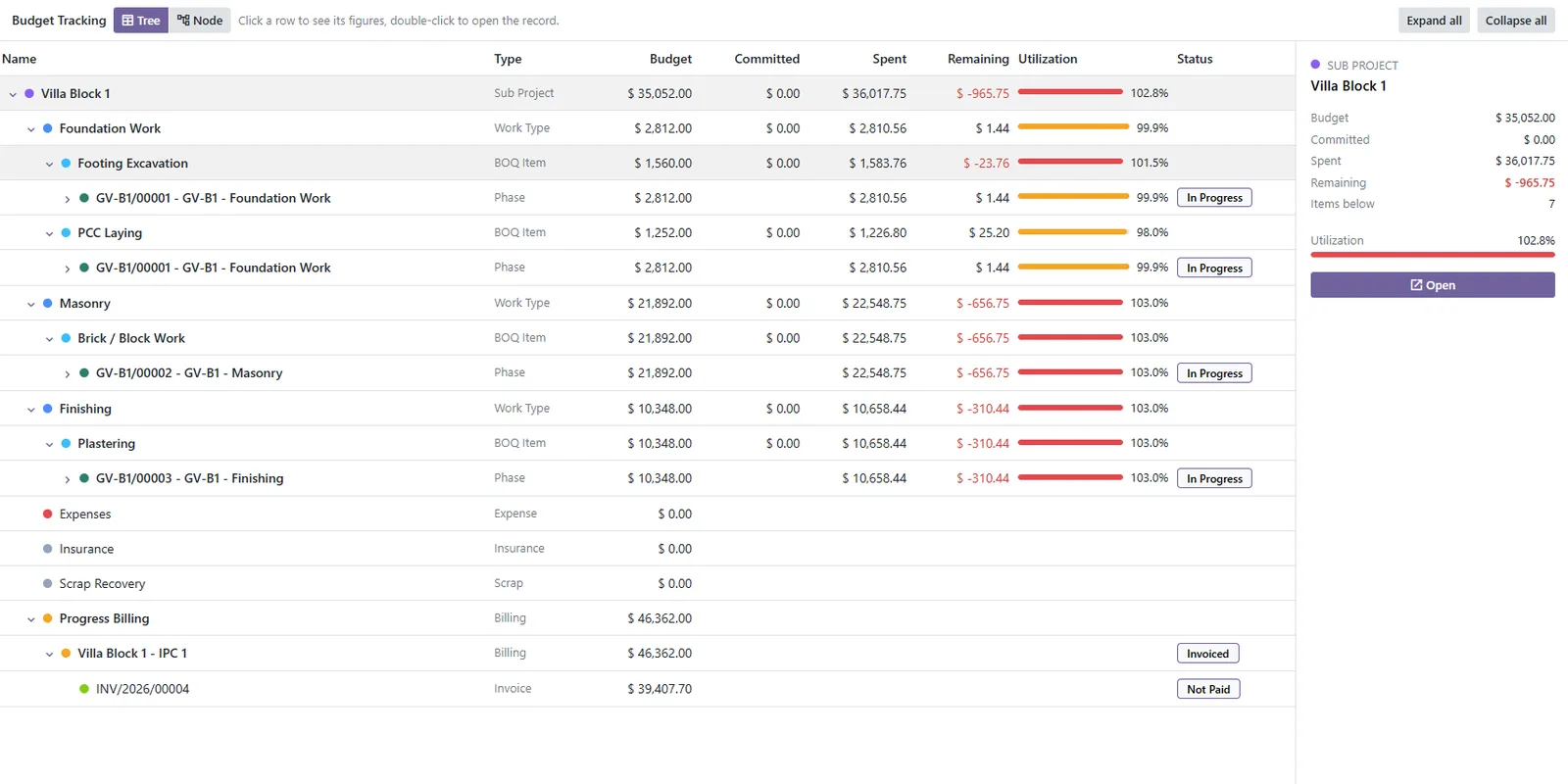
The budget tracking tree shows where every shilling went. Start at Superstructure, open Column Casting, then the phase, then the work order. Under it you see its purchase orders, subcontracts, RA bills and consume orders. When a line is over budget, you can follow it down to the exact document that caused it.
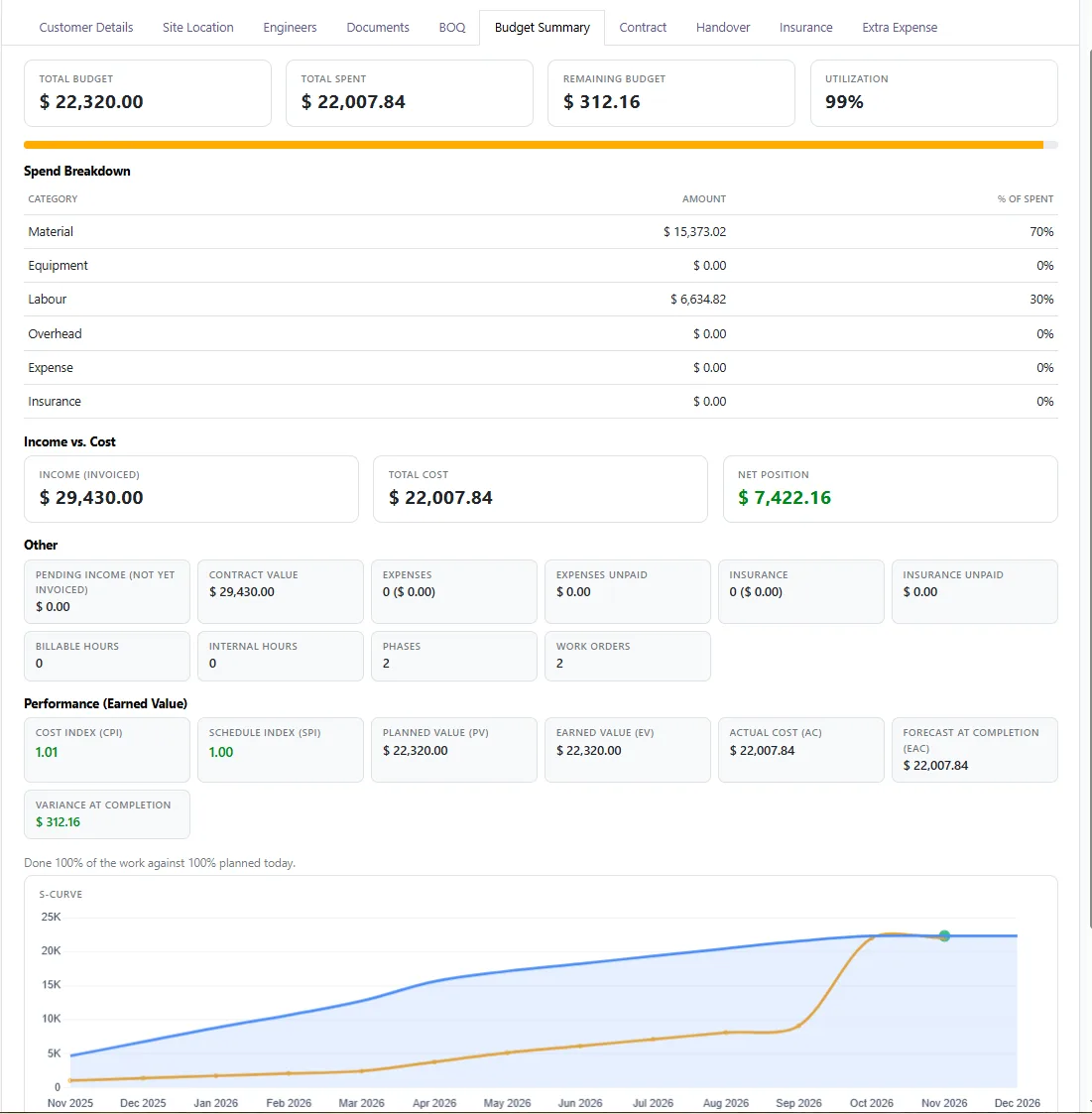
For the bigger picture, every sub-project has earned value management: planned value (PV), earned value (EV), actual cost (AC), cost and schedule performance indices (CPI, SPI), the estimate at completion (EAC), and an S-curve. A CPI below 1 tells you a job is costing more than it is earning, while you still have time to act.
For owners and MDs running several sites, the live construction dashboard has ten sections, including an overview, a projects list, a health matrix, a master Gantt you can adjust by dragging, and a map of your sites. Twelve printable reports, including the IPC, a budget statistics PDF and an Excel report, cover the site meeting, the board meeting and the bank.
Quality and snags
QC inspections use checklists. If an item fails, the system creates a snag and a rework activity for the responsible engineer. The failure is not just noted on paper and forgotten.
The right people see the right numbers
Access is based on roles. Site engineers see only their own sites, and finance figures are limited to a finance group.
8. Handover: close the job properly
At handover, the DLP starts. Snags raised during the DLP are tracked against the project, and the system reminds you 30 days before the DLP ends to close the open snags and claim your retention.
For many contractors, the final retention release is pure profit that is often collected late or not at all. Chesify Construction keeps it in view until it is paid.
Spreadsheets and WhatsApp vs Chesify Construction
| Spreadsheets & WhatsApp | Chesify Construction | |
|---|---|---|
| BOQ to budget | Copied by hand between files | Excel BOQ import, one click to budget |
| Budget changes | Edited in the sheet, no history | Change request with impact and reason, logged even if rejected |
| Overruns | Found at month-end | Budget vs committed vs actual, live |
| Materials | Moved between sites without records | Own site store per sub-project; consume orders with QC, costed to the budget line |
| Subcontractor bills | Paid on trust, retention tracked by memory | RA bills with QC approval and automatic retention |
| Client IPC | Prepared by hand over days | Calculated from progress, certified by the PM, invoiced in one click |
| Retention and DLP | Often forgotten | Tracked, with a reminder 30 days before DLP end |
| Site progress | Phone calls and photos in a group | Site diary that updates progress and earned value |
| Accounting | Re-entered by the accountant | Same system: Purchase, Inventory, Accounting, Project, HR/Timesheets |
Who this is for
Chesify Construction is a good fit if you can tick two or more of these:
- You run between 2 and 15 sites at the same time, in Tanzania or elsewhere in East Africa.
- Your BOQs and budgets live in Excel, and they rarely match what was actually spent.
- You have found out a project was over budget only after the money was gone.
- Materials move between sites and nobody can say for sure where they ended up.
- You use labour or equipment subcontractors and track their retention by hand.
- Your QS spends days preparing each IPC.
- You have retention money from finished projects that you have not yet collected.
- You already use Odoo, or you are ready to move from separate tools to one system.
Frequently asked questions
Can I import my existing BOQ from Excel?
Yes. The BOQ can be imported from an xlsx file onto the sub-project. In the demo, we load one of your real BOQs so you can see how it looks.
Does it work for firms that use a lot of subcontractors?
Yes. Labour and equipment subcontracts are built in, with RA bills, QC approval before the vendor bill, automatic retention, work completion certificates and retention release bills.
Is it for Odoo Community or Enterprise?
Chesify Construction is built on Odoo 20. Ask us about your edition and we will tell you what applies to your setup.
How long does it take to go live?
It depends on how many sites you run, how your BOQs are prepared and what data you bring across. We plan the rollout with you, site by site, instead of giving you a number before we understand your business.
Can site engineers use it on their phones?
Yes. Odoo works in the mobile browser, so engineers can fill in the site diary, raise material requisitions and update work orders from site.
We already use Odoo for accounting. Do we start again?
No. Chesify Construction works with Odoo Purchase, Inventory, Accounting, Project and HR/Timesheets, so it builds on what you already have.
See your own BOQ running in 45 minutes
Do not judge this module from a brochure. Send us one of your real BOQs in Excel. In a 45-minute demo, we will load it into Chesify Construction and show you its budget, your first IPC with retention and advance recovery, and how cost tracking would have looked on that job.
Book your demo on WhatsApp. One message is enough to get started.
Want to read more first? See how we work with contractors on our construction industry page.
Chesify Labs is an Odoo partner based in Dar es Salaam. We build and support Odoo for Tanzanian businesses, and we built Chesify Construction for how contractors here actually work.